How to Fix GB WhatsApp Ban: Safe and Proven Methods (2026)
Getting banned on GB WhatsApp is frustrating especially when you rely on it daily. But before you panic, know this: most bans are temporary, and many can be reversed. Even permanent bans sometimes have a path back.
This guide covers what the different types of bans mean, how to appeal them, and what actually works in 2026.
Understanding the Types of Bans
Not all bans are equal. WhatsApp issues different types depending on what triggered the flag.
Temporary Ban
The most common type. Your account is suspended for a set period usually 24 to 72 hours. You’ll see a message telling you how long you need to wait. These happen frequently to mod users when WhatsApp runs a detection sweep.
What to do: Wait it out. Don’t try to log in repeatedly during the ban period that can escalate it.
Soft Ban / Warning
You can still use the app, but you get a notification warning that your account “may be banned.” This is WhatsApp’s way of flagging suspicious client behavior before taking action.
What to do: Update GB WhatsApp immediately and reduce any behavior that could look like spam (mass messaging, rapid group additions, etc.).
Permanent Ban
Your number is blocked from WhatsApp entirely. The message typically reads: “Your phone number is banned from using WhatsApp. Please contact support for help.”
What to do: This requires an appeal more on that below.
Step 1: Update GB WhatsApp Right Now
Before anything else, update to the latest version from [GBWSPLUS.COM]. Outdated builds are the single biggest reason mod users get flagged. A current build with up-to-date anti-ban features reduces your exposure significantly.
If you’re currently banned, update the APK and wait out the restriction period before trying to log in again.
Step 2: For Temporary Bans Wait, Then Log In on the New Build
Once your ban timer expires:
- Open the updated GB WhatsApp
- Log in with your number
- Don’t do anything unusual for the first 24–48 hours no mass messages, no group-adding sprees, just normal usage
Your account will typically recover cleanly after a temporary ban if you’re on a current build.
Step 3: For Permanent Bans Submit an Appeal
WhatsApp does review ban appeals, and a meaningful percentage of permanent bans are reversed through the in-app appeal process.
How to appeal:
- Open GB WhatsApp (or the official WhatsApp either works for the appeal)
- On the ban screen, tap “Support” or “Request a Review”
- You’ll be asked to verify your number again
- A message will be sent to WhatsApp’s support team requesting a review
Be patient responses can take 24 to 72 hours. WhatsApp support does not offer live chat for ban reviews.
Step 4: Send a Manual Appeal Email
If the in-app appeal doesn’t get a response within 72 hours, send a follow-up email to support@whatsapp.com with:
- Your phone number (in international format, e.g., +92-XXX-XXXXXXX)
- A brief, polite explanation that you believe your account was incorrectly banned
- A request for review
Keep the tone straightforward. Don’t mention GB WhatsApp or any mod frame it as a general appeal.
Sample message:
“Hello, my WhatsApp account associated with [your number] has been banned. I believe this may have been done in error and I would appreciate a review of my account. I use WhatsApp for personal communication and have not violated any terms of service intentionally. Please let me know how I can resolve this. Thank you.”
Step 5: If the Appeal Fails New Number Strategy
If WhatsApp denies the appeal or doesn’t respond after several days, your options narrow. The practical path forward for most users is:
- Register a new number on GB WhatsApp
- Use your banned number only on the official WhatsApp (if it still works there)
This isn’t ideal, but it’s the realistic outcome for a small percentage of permanent bans where WhatsApp doesn’t reverse the decision.
What Causes GB WhatsApp Bans? (And How to Avoid Them)
Understanding the triggers helps you avoid future bans:
| Trigger | Why It Flags You | How to Avoid |
|---|---|---|
| Outdated GB WhatsApp build | Old signatures don’t match server expectations | Update every 4–6 weeks |
| Mass messaging | Looks like spam behavior | Don’t send bulk messages |
| Rapid group adding | Triggers bot detection | Add people to groups gradually |
| Using fake/unofficial APKs | Tampered builds have no anti-ban | Only download from trusted sources |
| Multiple device logins | Session conflicts | Stick to one device per number |
| Reported by other users | Other users block and report your number | Avoid messaging people who haven’t consented |
Do Anti-Ban GB WhatsApp Versions Actually Work?
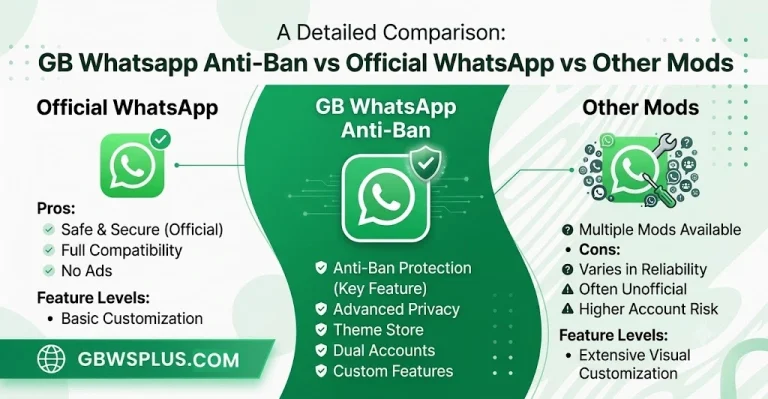
Yes but with limits. Anti-ban versions use modified signatures and connection protocols that reduce the chance of detection. They don’t make your account immune, but they meaningfully lower the risk when combined with responsible usage.
The key phrase is “combined with responsible usage.” An anti-ban APK won’t protect an account that’s sending thousands of messages a day or being reported en masse. It’s a shield, not a free pass.
The latest GB WhatsApp builds from [GBWSPLUS.COM] include current anti-ban protection. Staying updated is the best single thing you can do.
Frequently Asked Questions
How long does a temporary ban last? Typically 24 to 72 hours, though some users report bans of up to a week for repeated violations.
Can I use a different phone during a ban? Bans are tied to your phone number, not your device. Switching phones won’t lift a number-based ban.
Will a factory reset help? No. The ban is on your account number, not your device’s hardware ID.
What’s the fastest way to get back online? Update GB WhatsApp, wait for the ban period to end, then log in normally. Avoid repeatedly attempting to log in during the ban.
![How to Fix You Need the Official WhatsApp to Log In Error [2026]](https://gbwsplus.com/wp-content/uploads/2026/06/How-to-Fix-You-Need-the-Official-WhatsApp-to-Log-In-Error-2026-768x384.webp)